Showing posts with label AIX. Show all posts

Friday, November 18, 2016

Problems creating DB2 UDB LUW db from GUI tools

I've had tons of problems creating db's (or doing some other operations) from the GUID tools, including Data Studio, and the control center (under db2 9.7).

It's always complained about the DAS, but the DAS (the DB2 Administration Server) is always happily running.

Today I stumbled across something that told me to issue the following command:
db2admin create

I then ran a
db2admin start

!!!! WORKED LIKE A CHARM !!!!

After that, I was able to successfully verify the instance, connect, and create the db I was trying to create.

Sorry - wish I had captured some screenshots along the way, but now that I've fixed it, I can't reproduce ;-)

At any rate, hope this helps someone.

Wednesday, March 25, 2015

Recording General System Performance Data for AIX

Collect Topas Info

Introduction

I identified a need to record general system information for review in association with DB2TOP data.
This is the very brief procedure I developed to do so.

Generate the data

Execute TOPAS_NMON by using the following commands:
topas_nmon -s 5 -c 100 -f
This will sample every 5 seconds for 100 samples and save to a file in your current directory.
NOTE: You can also leave off the -c and just let it run. When ready to stop it, issue kill command.
                ps -ef | grep -i "topas"
                then, use the kill command, passing in the pID, to end it.

Analyze using NMON Analyzer

  1. Download NMON Analyzer here. (https://www.ibm.com/developerworks/community/wikis/home?lang=en#!/wiki/Power+Systems/page/nmon_analyser  )
  2. Open NMON Analyzer.
  3. Enable Macros.
  4. Set Settings in Settings tab as desired. NOTE: Default values are fine.
  5. Set desired settings in Analyzer.
  6. Click "Analyze nmon data" button to perform analysis.


Tuesday, March 19, 2013

Issues with AIX newline characters on KSH files developed on Windows


To fix issues with the ^M from developing a .KSH file on windows and then uploaded to AIX:
1 - edit the file in vi (extremly useful vi cheatsheet found here: Vi Cheatsheet from LagMonster)
2 - do a substitution using the following keystrokes: :%s/[ctrlkey+v and ctrl-key+M]//g
This will appear as ...  :%s/^M//g … when you type it.
3 - save with :x

However, note that the command does not look like he says it does.  He reports the ctrl-v as printing this: :%s/^V^M//g.  For me, it did this: :%s/^M//g.

Tuesday, August 07, 2012

Auto Starting WebSphere Network Deployment V8 on AIX

We have very basic AIX, with no bells or whistles installed.
To create a launch script, the startmanager, startserver, and starnode scripts will generate this for you.  The command is
./startManager.sh -script -background
or
./startNode.sh -script -background
or
 ./startServer.sh -script -background

.. as appropriate...

In my case, I'm going to auto-start the deployment manager and the node agent, and then use the WAS monitoring policy to handle the individual app servers.

So, the steps are:

  1. Generate the startup scripts using the above commands.
  2. make a copy of rc.was (found in the was bin directory) for the deployment manager, and another for the node agent.  I called these rc.dm.was and rc.na.was.
    1. Edit these to point to the start_dmgr.sh and start_nodeagent.sh scripts generated above
  3. create entry in etc/Inittab for the two files created in step 2
    1. was:2:once:/usr/WebSphere/AppServer/bin/rc.dm.was >/dev/console 2>&1
    2. was:2:once:/usr/WebSphere/AppServer/bin/rc.na.was >/dev/console 2>&1
And, that should do it.  Let's see if it works :-)


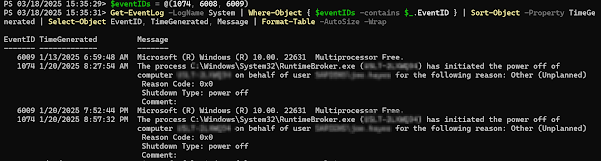
Get Restart log using PowerShell

I'm often curious about a restart on a Windows server system. An easy way to get a list of the restart and what initiated it is to use t...