I ran into a situation today where I needed to alter all tables for an MS SQL Server 2005 database.
A quick Google revealed this post from Ruslan Trifonov.
exec sp_MSforeachtable "ALTER SCHEMA new_schema TRANSFER ? PRINT '? modified' "
Excellent :-) That was easy ...
Reference to ALTER SCHEMA command is here.
In it's simplest form, the command appears to take this shape: ALTER SCHEMA HumanResources TRANSFER Person.Address;
For those who aren't familiar with the '?' in T/SQL, it's represents a parameter, so this statement is parameterized. Essentially, sp_MSforeachtable is going to pass the name of each table to statement/query.
Great stuff. Big thanks to Ruslan. That was easy :-)
Showing posts with label SQL Server Administration. Show all posts
Showing posts with label SQL Server Administration. Show all posts
Thursday, March 21, 2013


Tuesday, March 19, 2013
Email your SQL Server Administrators regarding the last backups for databases
The following script will send a notification that tells when the last database backup was performed.
EXEC msdb.dbo.sp_send_dbmail
@profile_name = 'Sqlalerts',
@recipients = 'first.last@somoecompany.com',
@copy_recipients ='first.last@somoecompany.com',
@query ='exec msdb.dbo.uspMonitorbackups',
@query_result_separator=' ',
@subject = 'DB's w/o backups for last 10 days on SS Instance Name',
@attach_query_result_as_file = 0,
@body= 'Database without backup from last 10 days',
@body_format='text',
@query_result_width = 1000,
@append_query_error = 1,
@query_result_no_padding = 1;
Most of these parameters are self-explanatory. I will say that profile_name = the profile FROM which the email will be sent. This ends up in the "FROM" line of the email.
sp_send_dbmail documentation can be found here: http://msdn.microsoft.com/en-us/library/ms190307.aspx
The contents of uspMonitorbackups is as follows:
USE [msdb]
GO
/****** Object: StoredProcedure [dbo].[uspMonitorbackups] Script Date: 03/19/2013 16:51:51 ******/
SET ANSI_NULLS ON
GO
SET QUOTED_IDENTIFIER ON
GO
Create procedure [dbo].[uspMonitorbackups]
as
SELECT sd.name,
bs.TYPE,
bs.database_name,
max(bs.backup_start_date) as last_backup,
CONVERT(varchar(30),DATABASEPROPERTYEX(sd.name,'Status')) as [Database Status]
FROM master..sysdatabases sd
Left outer join msdb..backupset bs on rtrim(bs.database_name) = rtrim(sd.name)
left outer JOIN msdb..backupmediafamily bmf ON bs.media_set_id = bmf.media_set_id
WHERE bs.type = 'D'
Group by sd.name,
bs.TYPE,
bs.database_name
HAVING (MAX(bs.backup_start_date) < DATEADD(dd,-10,GETDATE()))
Subscribe to:
Posts (Atom)
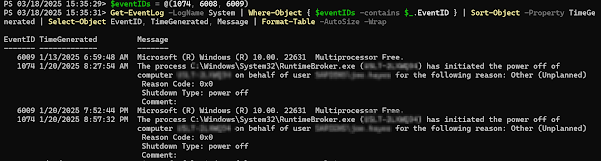
Get Restart log using PowerShell
I'm often curious about a restart on a Windows server system. An easy way to get a list of the restart and what initiated it is to use t...
-
Most of what we're going to want to look at when you're having production issues are available through DMV's. If granti...
-
I'm often curious about a restart on a Windows server system. An easy way to get a list of the restart and what initiated it is to use t...
-
I’ve been having some trouble getting DBCA to run in order to create databases. Thought I’d share it with you, and thus document it for la...
