Showing posts with label notifications. Show all posts

Tuesday, July 16, 2013

Getting immediate notifications for deadlocks in SQL Server

Today I learned that I can get immediate notification of deadlocks in SQL Server.  This is very useful, since one of our applications is prone to deadlocks (due to it's remarkable configurability), and these can be difficult to reproduce, especially in production.

First - a disclaimer.  This method does not email the deadlock graph to you, only an alert saying that the deadlock has occurred.  It is assumed that you are running a server-side trace to capture the necessary information for trouble-shooting.  This is only to give you the alert.

    1. Assure that the 1205 message is actually logged. (very good info on this in Michael K. Campbell's article for Practical SQL Server)
                      EXEC master..sp_altermessage 1205, 'WITH_LOG', TRUE;
                      GO
    1. Assure that SQLMail is configured
      1. NOTE: The step I forget most often is to assure that mail is enabled under SQL Server Agent -> Properties, as is outlined here.
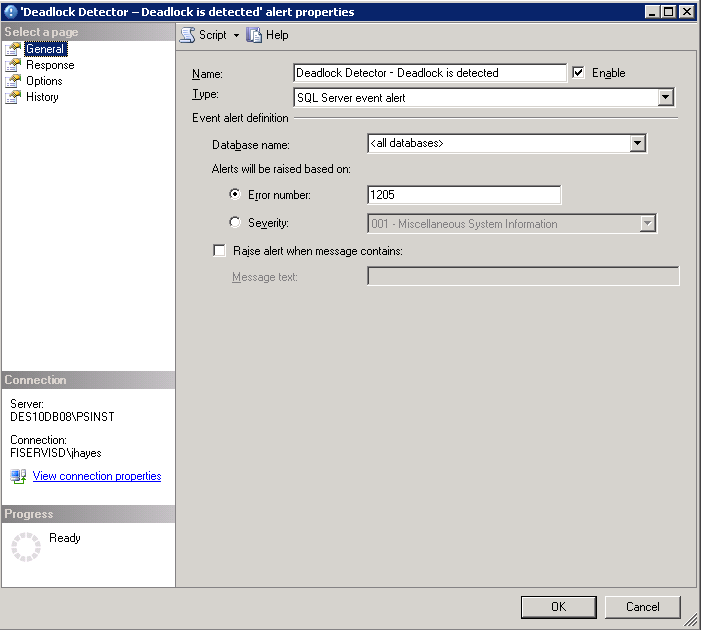
    2. Create an alert for 1205 message.
  1. NOTE: This will only set up the notification.  You also have to configure a default monitor to detect deadlocks.  The mail will only prompt you to go and have a look at the deadlock trace!
References used in compiling this procedure:


Info on the error message I encountered in using sqlmail with alerts:
Error: An attempt was made to send an email when no email session has been established
Link  ; http://www.sqldbadiaries.com/2010/07/27/an-attempt-was-made-to-send-an-email-when-no-email-session-has-been-established-sql-server-2005/

Procedure for setting up alerts:
http://sqlmag.com/blog/enabling-email-alerts-sql-server-deadlocks

Test Script to simulate deadlock:
http://www.sqlteam.com/forums/topic.asp?TOPIC_ID=49692 


Tuesday, March 19, 2013

Email your SQL Server Administrators regarding the last backups for databases


The following script will send a notification that tells when the last database backup was performed.

EXEC msdb.dbo.sp_send_dbmail
@profile_name = 'Sqlalerts',
@recipients = 'first.last@somoecompany.com',
@copy_recipients ='first.last@somoecompany.com',
@query ='exec msdb.dbo.uspMonitorbackups',
@query_result_separator=' ',
@subject = 'DB's w/o backups for last 10 days on SS Instance Name',
@attach_query_result_as_file = 0,
@body= 'Database without backup from last 10 days',
@body_format='text',
@query_result_width = 1000,
@append_query_error = 1,
@query_result_no_padding = 1;

Most of these parameters are self-explanatory.  I will say that profile_name = the profile FROM which the email will be sent.  This ends up in the "FROM" line of the email.

sp_send_dbmail documentation can be found here: http://msdn.microsoft.com/en-us/library/ms190307.aspx 

The contents of uspMonitorbackups is as follows:

USE [msdb]
GO
/****** Object:  StoredProcedure [dbo].[uspMonitorbackups]    Script Date: 03/19/2013 16:51:51 ******/
SET ANSI_NULLS ON
GO
SET QUOTED_IDENTIFIER ON
GO
  Create procedure [dbo].[uspMonitorbackups]
  as
   SELECT  sd.name,
        bs.TYPE,
        bs.database_name,
        max(bs.backup_start_date) as last_backup,
        CONVERT(varchar(30),DATABASEPROPERTYEX(sd.name,'Status')) as [Database Status]
FROM    master..sysdatabases sd
        Left outer join msdb..backupset bs on rtrim(bs.database_name) = rtrim(sd.name)
        left outer JOIN msdb..backupmediafamily bmf ON bs.media_set_id = bmf.media_set_id
WHERE     bs.type = 'D'
Group by sd.name,
        bs.TYPE,
        bs.database_name
HAVING (MAX(bs.backup_start_date) < DATEADD(dd,-10,GETDATE()))

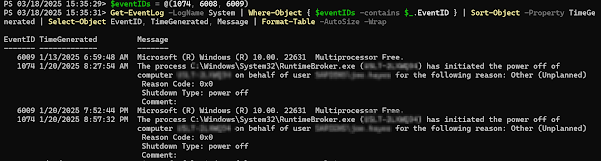
Get Restart log using PowerShell

I'm often curious about a restart on a Windows server system. An easy way to get a list of the restart and what initiated it is to use t...