Showing posts with label Microsoft SQL Server. Show all posts

Thursday, July 18, 2019

SQL Server ReIndexing Jobs fail due to full transaction logs


We've encountered issues with a couple of our customers wherein, as that database grows, index maintenance becomes difficult to manage.
In some cases, because the indexes become quite large, the index rebuilds on badly fragmented indexes fill the transaction logs.

For one of our customers, we resolved it in part by altering the recovery model to be BULK LOGGED during the index maintenance.
Index Rebuild operations qualify as a minimally logged operation, and can therefore take advantage of reduced logging in BULK LOGGED recovery model.

I wanted to do some research or testing before I recommended this, because it’s a big deal to change recovery models, do index maintenance, and then switch back.
I did find a link to someone else who did some testing, though, and found that using bulk logged would, indeed, reduce log file growth during  re-indexing.

(Thanks to Balmukund for running and publishing this test!!!)

For his test Balmukund used Adventure Works, of course 😉. Classic 😀

In FULL RECOVERY MODE, the DBCC Reindex used about 100 MB space. 
(by my math using rounding: 41-2 = 39% used. 258 *.39 = 100.62)

In BULK LOGGED, it used about 2.5 MB.  
(again, rounding: 4.77- 2.98 = 1.8% of 258 is 2.58.)

This is a *VERY* significant difference. 
While I understand that switching back and forth between FULL and BULK LOGGED recovery model is scary, this remains something  to keep in our hip pocket when index maintenance is filling the transaction log! 

TODO: Verify that partitioning the table/index (es) involved will not also help this situation. My guess is that it will not, because there is only one transaction log for a database in sql server, and logging is logging. Still, I'd like to test the theory.

Someday 😏


Wednesday, October 04, 2017

MS SQL Server Max Memory Size for given Server Physical Memory

Glenn Berry, over at SQL Server Central, has written an excellent and straight-forward guide to initial settings for max memory in SQL Server, given the amount of memory available on the server.

Suggested Max Memory Settings for SQL Server 2005/2008

I would encourage you to visit his article for details, but here follows the crux of the matter:
Physical RAM                        MaxServerMem Setting
2GB                                           1500
4GB                                           3200
6GB                                           4800
8GB                                           6400
12GB                                         10000
16GB                                         13500
24GB                                         21500
32GB                                         29000
48GB                                         44000
64GB                                         60000
72GB                                         68000
96GB                                         92000
128GB                                       124000

Again, note that he goes on to give more advice on tuning with additional products, and how much memory should be available to the system when under max load. I would encourage you to check out the original article.


Friday, September 15, 2017

Creating Hash Values for Strings In MSSQL, DB2 UDB for LUW, and Oracle

It will often occur that we need to search a large character string in a relational database, something like an email address, postal address, etc.

For the most part, when we do such searches, we're searching for a sub-string within that large string of characters.

However, for instances where we know we need an equivalency search, we can make things more efficient by generating a hash of the string and then storing that in an indexed column.

This can be done in all 3 of the major RDBMS platforms.  Links below:

MSSQL uses the CHECKSUM() function.
DB2 LUW uses the DBMS_UTILITY.GET_HASH_VALUE() function.
Oracle uses the ORA_HASH function.

This article by Jeff Reinhard over at SQLServerCentral.com is what inspired me to look for the similar function in DB2 & Oracle, and it does a very nice job of explaining the use case for this using an e-mail address scenario.

If anyone knows how to do this in postgressql or MySQL, I'd love to have you add a few words or link in the comments. Thanks! :)

Wednesday, August 31, 2016

Thursday, July 16, 2015

Monitor SQL Server Service using PowerShell

Mashrur Shuvo posted a script over at SQL Server Central that will user powershell to monitor your sql server services.

If you're like me, and you have trouble getting budget approval for 3rd party monitoring tools, then this is very Useful (with a capital - U ;-)   ) !
http://www.sqlservercentral.com/scripts/Monitor+SQL+Server+and+Service/127705/

Friday, September 05, 2014

Regular Expressions in SQL Server, DB2 UDB, and Oracle

I was a bit surprised that not all RDBMS platforms offer robust, native support for regular expressions.

Oracle:

Oracle introduced this in 10g. It is implemented in roughly the way I would expect and looks like it's pretty useful.
Reference

DB2:

DB2 seems to have this capability in 9.7. NOTE that I have not checked to see if it was available in earlier releases.  However, it appears you have to go through the XQuery interface. I'm not surprised by this, but a bit disappointed.  I had hoped for an implementation more like Oracle's. I think that the DB2 way is going to be cumbersome for the average user.

Example:
db2 "with val as (
 select t.text
 from texts t
 where xmlcast(xmlquery('fn:matches(\$TEXT,''^[A-Za-z 0-9]*$'')') as integer) = 0
)
select * from val"

Reference1, IBM DB2 for LUW 9.7 information center reference

MS SQL Server: 

SQL Server, it seems, requires you to roll your own solution or look to some sort of 3rd party.  I'm very surprised by this.

There are 3rd party libraries that appear to be pretty robust.  One example can be found here: SQL Server Central article on RegEx in MSSQL Server

I suppose that they want us to use the full text search, which appears to have robust features, and address the same purpose.  Still, just a bit surprised ...

Wednesday, February 05, 2014

Opening files in SSMS as query files when they don't have .sql as extension

SSMS (SQL Server Management Studio) will happily load a *.sql file and execute it as a SQL Script.
However, we store our DDL files as .DDL.

I was able to convince SSMS to treat these as sql scripts in the following way:

Tools -> Options
Expand Text Editor
Select File Extension
Add an extension.  NOTE: Make sure to select "SQL Query Editor" in the "Editor" drop-down.


And, voila!

Tuesday, July 16, 2013

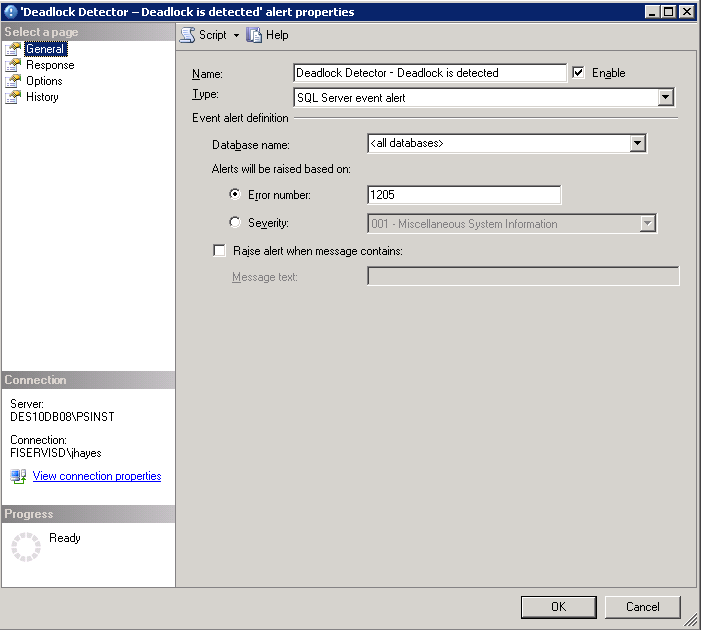
Getting immediate notifications for deadlocks in SQL Server

Today I learned that I can get immediate notification of deadlocks in SQL Server.  This is very useful, since one of our applications is prone to deadlocks (due to it's remarkable configurability), and these can be difficult to reproduce, especially in production.

First - a disclaimer.  This method does not email the deadlock graph to you, only an alert saying that the deadlock has occurred.  It is assumed that you are running a server-side trace to capture the necessary information for trouble-shooting.  This is only to give you the alert.

    1. Assure that the 1205 message is actually logged. (very good info on this in Michael K. Campbell's article for Practical SQL Server)
                      EXEC master..sp_altermessage 1205, 'WITH_LOG', TRUE;
                      GO
    1. Assure that SQLMail is configured
      1. NOTE: The step I forget most often is to assure that mail is enabled under SQL Server Agent -> Properties, as is outlined here.
    2. Create an alert for 1205 message.
  1. NOTE: This will only set up the notification.  You also have to configure a default monitor to detect deadlocks.  The mail will only prompt you to go and have a look at the deadlock trace!

References used in compiling this procedure:


Info on the error message I encountered in using sqlmail with alerts:
Error: An attempt was made to send an email when no email session has been established
Link  ; http://www.sqldbadiaries.com/2010/07/27/an-attempt-was-made-to-send-an-email-when-no-email-session-has-been-established-sql-server-2005/

Procedure for setting up alerts:
http://sqlmag.com/blog/enabling-email-alerts-sql-server-deadlocks

Test Script to simulate deadlock:
http://www.sqlteam.com/forums/topic.asp?TOPIC_ID=49692 


Thursday, March 28, 2013

Detecting Transaction Isolation Level through Profiler Trace and other means on MS SQL Server 2005

I doubt that this comes up often, but I find myself in a bit of an argument about what isolation level will be used for transactions in our SQL Server database when the transaction is initiated by WebSphere.  There are various documents that indicate how WebSphere can over ride this value.

I decided to dig into this a bit further.

TRACE:

In doing so, I found that I could monitor our SQL Server DB to determine this.

I have only found two places where the transaction isolation level is appearing:
1 - Sessions:Existing Connection.Text Data
2 - In a deadlock trace as part of the XML output.

If anyone can find it elsewhere, I'd love to hear from you.  However, this makes sense, since this is more-or-less controlled at the session level.

QUERY:
If found that 
DBCC USEROPTIONS
would give me the *default* TIL for the db, but that if that TIL was altered by the session, it would not reflect that.

To get the TIL for *your session*, you can run the following query:

SELECT CASE transaction_isolation_level WHEN 0 THEN 'Unspecified' WHEN 1 THEN 'ReadUncomitted' WHEN 2 THEN 'Readcomitted' WHEN 3 THEN 'Repeatable' WHEN 4 THEN 'Serializable' WHEN 5 THEN 'Snapshot' END AS TRANSACTION_ISOLATION_LEVEL FROM sys.dm_exec_sessions

Credit to StackOverflow question and answer here: http://stackoverflow.com/questions/1038113/how-to-find-current-transaction-level 

Thursday, March 21, 2013

Altering schema for all tables in MS SQL Server 2005

I ran into a situation today where I needed to alter all tables for an MS SQL Server 2005 database.
A quick Google revealed this post from Ruslan Trifonov.

exec sp_MSforeachtable "ALTER SCHEMA new_schema TRANSFER ? PRINT '? modified' "

Excellent :-)  That was easy ...

Reference to ALTER SCHEMA command is here.
In it's simplest form, the command appears to take this shape: ALTER SCHEMA HumanResources TRANSFER Person.Address;

For those who aren't familiar with the '?' in T/SQL, it's represents a parameter, so this statement is parameterized.  Essentially, sp_MSforeachtable is going to pass the name of each table to statement/query.

Great stuff. Big thanks to Ruslan. That was easy :-)

Tuesday, March 19, 2013

Email your SQL Server Administrators regarding the last backups for databases


The following script will send a notification that tells when the last database backup was performed.

EXEC msdb.dbo.sp_send_dbmail
@profile_name = 'Sqlalerts',
@recipients = 'first.last@somoecompany.com',
@copy_recipients ='first.last@somoecompany.com',
@query ='exec msdb.dbo.uspMonitorbackups',
@query_result_separator=' ',
@subject = 'DB's w/o backups for last 10 days on SS Instance Name',
@attach_query_result_as_file = 0,
@body= 'Database without backup from last 10 days',
@body_format='text',
@query_result_width = 1000,
@append_query_error = 1,
@query_result_no_padding = 1;

Most of these parameters are self-explanatory.  I will say that profile_name = the profile FROM which the email will be sent.  This ends up in the "FROM" line of the email.

sp_send_dbmail documentation can be found here: http://msdn.microsoft.com/en-us/library/ms190307.aspx 

The contents of uspMonitorbackups is as follows:

USE [msdb]
GO
/****** Object:  StoredProcedure [dbo].[uspMonitorbackups]    Script Date: 03/19/2013 16:51:51 ******/
SET ANSI_NULLS ON
GO
SET QUOTED_IDENTIFIER ON
GO
  Create procedure [dbo].[uspMonitorbackups]
  as
   SELECT  sd.name,
        bs.TYPE,
        bs.database_name,
        max(bs.backup_start_date) as last_backup,
        CONVERT(varchar(30),DATABASEPROPERTYEX(sd.name,'Status')) as [Database Status]
FROM    master..sysdatabases sd
        Left outer join msdb..backupset bs on rtrim(bs.database_name) = rtrim(sd.name)
        left outer JOIN msdb..backupmediafamily bmf ON bs.media_set_id = bmf.media_set_id
WHERE     bs.type = 'D'
Group by sd.name,
        bs.TYPE,
        bs.database_name
HAVING (MAX(bs.backup_start_date) < DATEADD(dd,-10,GETDATE()))

Thursday, October 11, 2012

Trace SQL Server using Scripting and No Client for Better Performance

There is a very good article on creating server side traces in SQL Server here:
SQL Server Pedia - Server Side Traces

The essence of the whole thing is this:
Monitoring using the SQL Server Profiler creates considerable overhead, whether you run it on the server that hosts the database itself, or on a client machine.
Monitoring using a script of the sort generated in the linked article, on the other hand, creates nearly zero performance degradation (per Linchi Shea's fine article, found here: trace-profiler-test).  I have linked to Linchi's test results as well as the article.  Test Results


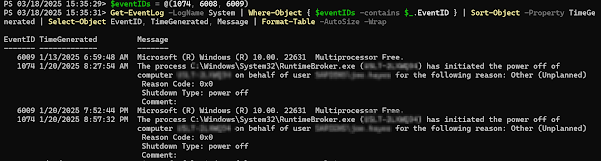
Get Restart log using PowerShell

I'm often curious about a restart on a Windows server system. An easy way to get a list of the restart and what initiated it is to use t...