Showing posts with label Windows. Show all posts

Tuesday, March 18, 2025

Get Restart log using PowerShell

I'm often curious about a restart on a Windows server system.

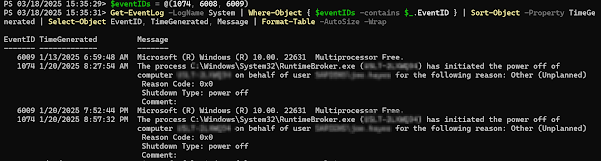
An easy way to get a list of the restart and what initiated it is to use the following powershell script.

$eventIDs = @(1074, 6008, 6009)

Get-EventLog -LogName System | Where-Object { $eventIDs -contains $_.EventID } | Sort-Object -Property TimeGenerated | Select-Object EventID, TimeGenerated, Message | Format-Table -AutoSize -Wrap


It will produce output similar to this: 


Thursday, April 28, 2022

DBT-50000 when using DBCA.bat on Windows (Oracle 19.11)

I’ve been having some trouble getting DBCA to run in order to create databases.

Thought I’d share it with you, and thus document it for later 😉


The error I get is:


[FATAL] [DBT-50000] Unable to check available system memory.

   CAUSE: An exception occured while checking kernel parameter.

*ADDITIONAL INFORMATION:*

Exception details

- PRVG-1901 : failed to setup CVU remote execution framework directory "C:\Users\TheUserName\AppData\Local\Temp\CVU_19.0.0.0.0_TheUserName\" on nodes "TheServerName" Please select a different work area for the framework PRVH-0516 : failed to retrieve CVU remote execution framework version from node "TheServerName" during an attempt to setup remote execution framework directory "C:\Users\TheUserName\AppData\Local\Temp\CVU_19.0.0.0.0_TheUserName\" TheServerName : PRKN-1014 : Failed to execute remote command "C:\Users\TheUserName\AppData\Local\Temp\CVU_19.0.0.0.0_TheUserName\\exectask.exe" on node "TheServerName".Cannot run program "C:\Users\TheUserName\AppData\Local\Temp\CVU_19.0.0.0.0_TheUserName\\exectask.exe": CreateProcess error=2, The system cannot find the file specified TheServerName : Cannot run program "C:\Users\TheUserName\AppData\Local\Temp\CVU_19.0.0.0.0_TheUserName\\exectask.exe": CreateProcess error=2, The system cannot find the file specified


I couldn’t find an exact match in Oracle support, but I found my way to this Oracle support document citing a known defect when attempting to create a new db for RAC on Win 64, part of bug 29686671, which was supposed to be resolved in Oracle 19.4.  

This isn’t exactly that bug, but the work-around works for this as well. ¯\_(ツ)_/¯


NOTE: This seems to be a java problem, since simply adding -ignoreprereqs on dbca command line didn’t resolve it.

Issue was fixed by changing the part of dbca.bat that actually runs the java to ignore configuration parameters by adding this (-Doracle.assistants.dbca.validate.ConfigurationParams=false) to dbca.bat


I changed DBCA.bat

FROM

[…]


if [%CUSTOM_JRE%]==[] (

    "%ORACLE_HOME%\jdk\jre\BIN\JAVA" -DORACLE_HOME="%OH%" -DCV_HOME="%OH%" -Doracle.installer.not_bootstrap=true -DJDBC_PROTOCOL=thin -mx512m  -XX:-OmitStackTraceInFastThrow -XX:CompileCommand=quiet -XX:CompileCommand=exclude,javax/swing/text/GlyphView,getBreakSpot oracle.assistants.dbca.driver.DBConfigurator  %*

) else (

    "%CUSTOM_JRE%\BIN\JAVA" -DORACLE_HOME="%OH%" -DCV_HOME="%OH%" -Doracle.installer.not_bootstrap=true -DJDBC_PROTOCOL=thin -mx512m -XX:-OmitStackTraceInFastThrow -XX:CompileCommand=quiet -XX:CompileCommand=exclude,javax/swing/text/GlyphView,getBreakSpot oracle.assistants.dbca.driver.DBConfigurator  %*

)


TO

[…]


if [%CUSTOM_JRE%]==[] (

    "%ORACLE_HOME%\jdk\jre\BIN\JAVA" -Doracle.assistants.dbca.validate.ConfigurationParams=false -DORACLE_HOME="%OH%" -DCV_HOME="%OH%" -Doracle.installer.not_bootstrap=true -DJDBC_PROTOCOL=thin -mx512m  -XX:-OmitStackTraceInFastThrow -XX:CompileCommand=quiet -XX:CompileCommand=exclude,javax/swing/text/GlyphView,getBreakSpot oracle.assistants.dbca.driver.DBConfigurator  %*

) else (

    "%CUSTOM_JRE%\BIN\JAVA" -DORACLE_HOME="%OH%" -DCV_HOME="%OH%" -Doracle.installer.not_bootstrap=true -DJDBC_PROTOCOL=thin -mx512m -XX:-OmitStackTraceInFastThrow -XX:CompileCommand=quiet -XX:CompileCommand=exclude,javax/swing/text/GlyphView,getBreakSpot oracle.assistants.dbca.driver.DBConfigurator  %*

)


exit /B %ERRORLEVEL%


Tuesday, January 11, 2022

Reading Windows Event Log for Oracle Databases

Mythological creatures take many forms. Some have horns and hooves. Some have bodies combined from the union of different species. Some have scales and wings and breath fire.

I'm that rarest of all mythological creatures: The sort who runs production Oracle databases on Windows :-D

Friday, November 18, 2016

Problems creating DB2 UDB LUW db from GUI tools

I've had tons of problems creating db's (or doing some other operations) from the GUID tools, including Data Studio, and the control center (under db2 9.7).

It's always complained about the DAS, but the DAS (the DB2 Administration Server) is always happily running.

Today I stumbled across something that told me to issue the following command:
db2admin create

I then ran a
db2admin start

!!!! WORKED LIKE A CHARM !!!!

After that, I was able to successfully verify the instance, connect, and create the db I was trying to create.

Sorry - wish I had captured some screenshots along the way, but now that I've fixed it, I can't reproduce ;-)

At any rate, hope this helps someone.

Tuesday, April 05, 2016

Windows - Cannot remove empty file

Encountered a weird one, today. Unfortunately, I did not get screen-shots.
When trying to delete a folder, I got a message that I could not because a sub-folder was open in another program.
Tried from command line, and it said that the folder was not empty.

Hmmm. That's odd ;-)

So I went folder by folder up the chain and found one that was marked as read-only.  I changed that setting, and was able to delete my folders.

Hope this help someone. Sorry for the lack of screen-shots.

Monday, July 08, 2013

backup Db2- unable to force applications

When trying to backup a db on db2 LUW 9.5, I get the following message, even after running quiesce.

SQL1035N The database is currently in use. SQLSTATE=57019
 
There is some good advice involving authority here: http://www.dbforums.com/db2/1663529-backup-db2-unable-force-applications.html#post6596923

However, it did not apply to my situation.

In desperation, I decided to just restart the instance.
When I did, I got an error indicating invalid credentials.

I had to go into the Windows Service and change the password for the user.
That cleared up the issue.

Whaddya know...

Tuesday, March 19, 2013

Issues with AIX newline characters on KSH files developed on Windows


To fix issues with the ^M from developing a .KSH file on windows and then uploaded to AIX:
1 - edit the file in vi (extremly useful vi cheatsheet found here: Vi Cheatsheet from LagMonster)
2 - do a substitution using the following keystrokes: :%s/[ctrlkey+v and ctrl-key+M]//g
This will appear as ...  :%s/^M//g … when you type it.
3 - save with :x

However, note that the command does not look like he says it does.  He reports the ctrl-v as printing this: :%s/^V^M//g.  For me, it did this: :%s/^M//g.

Wednesday, September 26, 2012

RDP Scrollbars

Speaking of RDP:
I want to set my RDP session to be less wide than my monitor screen, but every bit as high.
This is an issue, because RDP wants to add the control area (minimize, maximize, etc) and leaves you with a scrollbar.

I got rid of this with the help of the article found here: http://manojtesting.blogspot.com/2011/11/pesky-scrollbars-on-remote-desktop.html

The answer is to add the following line to your default.rdp file, which you can edit with any text editor.
smart sizing:i:1

Fantastic :-)

EDIT: In Windows 10, I seem to have trouble finding default, RDP.
As noted here, the default location is %My Documents%\Default.rdp.

RDP Shortcut keys

Boy, these have made my life as a sysadmin a lot easier.  No longer need to have an RDP session in full-screen to do alt-tab etc.  Fantastic.  The ctrl-alt-minus + plus require you to use the +/- on the numeric keypad to create a local screenshot in the clipboard on the server.

A commenter also says CTRL+ALT+MINUS is equivalent to ALT+PRTSCRN, and CTRL+ALT+PLUS = PRINTSCRN.

http://msdn.microsoft.com/en-us/library/windows/desktop/aa383500(v=vs.85).aspx


Get Restart log using PowerShell

I'm often curious about a restart on a Windows server system. An easy way to get a list of the restart and what initiated it is to use t...