Just a quick note for those who may encounter it.
IBM's InfoCenters, or the ones for DB2 and WebSphere at any rate, are great at containing a fantastic amount of words that really don't tell you anything.
For task-based procedures, I like to go to DeveloperWorks and do a site search.
Wednesday, July 03, 2013


Tuesday, July 02, 2013
Tips for working an office-style job from your home.
Tips for Working from Home:
Make a space
This
space needs to be comfortable, but not TOO comfortable, and have few
distractions. It needs to offer the
quiet environment you need and allow you to focus on your work without thinking
about kids or other distractions
Don’t watch the kids, do chores, etc
For full
time WFH, it is unlikely that you’ll be able to do your best work if you’re
also attending to children. This is the
reason a lot of people want to work from home.
I suppose if you can do it and get away with it, OK, but for me, they
would be wanting too much attention and cause too many interruptions. My
children know that, when Dad’s at work and the office door is closed, they stay
away. When my wife has to work, we get a
baby-sitter.
If
someone calls you and needs you to do something, say no. If the spouse wants you to watch kids while
they run errands, say no. You are AT WORK (PERIOD).
Create a social Context
The lack
of human contact can be very isolating.
Create your own social outlet through a religious organization, hobby or
enthusiasts group, etc. It’s tough to
justify this if you’re working long hours and you have a family, but, at least
for me, it really is necessary to maintain an even keel.
Pretend someone is watching you.
Discipline
is tough, and it’s easy to let it break down when no one can see what you’re
doing.
Get Exercise!
You don’t
realize how much you move when going to the office, and being at the
office. Much of this very simple
movement can be lost if you work from your home. It is VITAL that you find a way to get
exercise. Go for a walk over lunch, join
a gym, do tai chi, whatever suits you, but for heaven’s sake, do something!
Thursday, May 23, 2013
Find out where you're logged on
As a sysadmin, I end up logged in all over the place.
Periodically, I'm asked to change my password, and if I'm not logged out from every server, it can cause all sorts of issues.
Update: 2013-11-11
Ignore everything below. This is so much easier than I was making it.
PsLoggedOn will simply scan your network and tell you where you're logged on. Not sure how I missed this!
http://technet.microsoft.com/en-us/sysinternals/bb897545
Example:
PsLoggedon.exe -l MyDomain\MyUser
*facepalm*
___
There is a WMIC command that can be used to see where you're logged in at on the network. This is probably the recommended way if you're running newer servers.
L
However, we still have a lot of older servers that don't fully support WMIC. I therefore take the following approach:
From command prompt, run
I then run
Note the >>, so that the SERVERLIST.txt is not overwritten by the output redirection.
I then execute PSLOGGEDON (download from sysinternals/PSTools) as follows:
NOTE: loggedon_output.txt is not truncated at any point. If you're like me and tend to run this from the same place over and over again, you'll need to clean it up manually before you begin.
Good luck :-)
Periodically, I'm asked to change my password, and if I'm not logged out from every server, it can cause all sorts of issues.
Update: 2013-11-11
Ignore everything below. This is so much easier than I was making it.
PsLoggedOn will simply scan your network and tell you where you're logged on. Not sure how I missed this!
http://technet.microsoft.com/en-us/sysinternals/bb897545
Example:
PsLoggedon.exe -l MyDomain\MyUser
*facepalm*
___
There is a WMIC command that can be used to see where you're logged in at on the network. This is probably the recommended way if you're running newer servers.
L
However, we still have a lot of older servers that don't fully support WMIC. I therefore take the following approach:
From command prompt, run
NET VIEW | FIND /I "DB" > SERVERLIST.txtThis populates the list with all DB servers (per our naming conventions).
I then run
NET VIEW | FIND /I "AS" >> SERVERLIST.txtThis, per our naming conventions, appends the app servers (hosting jboss or WebSphere).
Note the >>, so that the SERVERLIST.txt is not overwritten by the output redirection.
I then execute PSLOGGEDON (download from sysinternals/PSTools) as follows:
for /F %i in (SERVERLIST.txt) do PsLoggedon.exe -L %i >> loggedon_output.txt 2>&1This will read the systems in SERVERLIST.txt and, for each one, execute the PSLoggedon.exe -L command. Output will be piped to loggedon_output.txt.
NOTE: loggedon_output.txt is not truncated at any point. If you're like me and tend to run this from the same place over and over again, you'll need to clean it up manually before you begin.
Good luck :-)
Tuesday, April 30, 2013
WMIC to create a report of free disk space on servers
To see the free space on drives for a server, use the following command.
NOTE: Replace with the name of your server.
C:\temp>wmic /AGGREGATE:Off /FAILFAST:On /RECORD:outout.xml /NODE: "" logicaldisk get SystemName,description,DeviceID,FreeSpace
Description DeviceID FreeSpace SystemName
3 1/2 Inch Floppy Drive A: DEN01VMDBSOLO01
Local Fixed Disk C: 12263886848 DEN01VMDBSOLO01
Local Fixed Disk D: 78583287808 DEN01VMDBSOLO01
Local Fixed Disk E: 78348578816 DEN01VMDBSOLO01
CD-ROM Disc F: DEN01VMDBSOLO01
Network Connection R: 52428800000 DEN01VMDBSOLO01
Even better, you can do so for a whole list of servers, by
A) Creating a comma delimited or newline delimited (on server on each line) list of server names in a .txt file.
Example:
Server1
Server2
Server3
Server4
B) Replacing with @ServerList.txt, where ServerList.txt is the name of your text file.
Awesome.
NOTE: Replace
C:\temp>wmic /AGGREGATE:Off /FAILFAST:On /RECORD:outout.xml /NODE: "
Description DeviceID FreeSpace SystemName
3 1/2 Inch Floppy Drive A: DEN01VMDBSOLO01
Local Fixed Disk C: 12263886848 DEN01VMDBSOLO01
Local Fixed Disk D: 78583287808 DEN01VMDBSOLO01
Local Fixed Disk E: 78348578816 DEN01VMDBSOLO01
CD-ROM Disc F: DEN01VMDBSOLO01
Network Connection R: 52428800000 DEN01VMDBSOLO01
Even better, you can do so for a whole list of servers, by
A) Creating a comma delimited or newline delimited (on server on each line) list of server names in a .txt file.
Example:
Server1
Server2
Server3
Server4
B) Replacing
Awesome.
Tuesday, April 16, 2013
Issues with mouse direct-connected to hp EliteBook 8540w
CORRECTION:
Everything below the horizontal line is crazy-talk. Sorry.
It was a problem with the mouse itself. I believe the USB connection was damaged.
________________________________________________________________________________________
I've been having issues recently with my mouse disconnecting and then reconnecting for no apparent reason when plugged directly into a USB port on my laptop.
I went into Control Panel -> Mouse, and found that my pointer was configured as shown:
Before: Synaptics TouchStyk V2.0 on PS/2 Port 0

I changed it to use the V7.0 Synaptic driver, and it appears to be working much better.
After: Synaptics TouchPad V7.2 on PS/2 Port 3

I also recajiggered the pointer so it's bigger and has a tail.
Not sure if this will help anyone, ever, but it's been really annoying me, so I thought I'd share just in case ;-)
Everything below the horizontal line is crazy-talk. Sorry.
It was a problem with the mouse itself. I believe the USB connection was damaged.
________________________________________________________________________________________
I've been having issues recently with my mouse disconnecting and then reconnecting for no apparent reason when plugged directly into a USB port on my laptop.
I went into Control Panel -> Mouse, and found that my pointer was configured as shown:
Before: Synaptics TouchStyk V2.0 on PS/2 Port 0

I changed it to use the V7.0 Synaptic driver, and it appears to be working much better.
After: Synaptics TouchPad V7.2 on PS/2 Port 3

I also recajiggered the pointer so it's bigger and has a tail.
Not sure if this will help anyone, ever, but it's been really annoying me, so I thought I'd share just in case ;-)
Friday, April 05, 2013
Type an Ascii character in Windows, Alt Codes, Useful Links
If you're like me, you have a fairly limitted selection of special characters that you want to insert into your documents or messages on a regular basis.
There are several ways to do this, as outlined here:
http://www.timeatlas.com/5_minute_tips/general/making_cents_of_special_characters#.UV7QyFeS8hV
I've taken to using alt-codes for the ones I use most frequently. Memorizing a few of these can be a big time-saver. Good list here:
http://www.alt-codes.net/
Some of the ones I find most useful:
ALT-3 ♥
ALT- 14 ♫
ALT - 126 ~
ALT - 236 ∞
ALT - 241 ±
ALT - 242 ≥
ALT - 243 ≤
ALT - 0162 ¢ (Not in the linked page - look here: http://symbolcodes.tlt.psu.edu/accents/codealt.html)
ALT - 0169 © (Not in the linked page - look here: http://symbolcodes.tlt.psu.edu/accents/codealt.html)
ALT - 0174 ® (Not in the linked page - look here: http://symbolcodes.tlt.psu.edu/accents/codealt.html)
Those who write Spanish will find these useful:
¿ ALT-168
¡ ALT-173
There are also some accented letters you can check into, found here:
http://symbolcodes.tlt.psu.edu/bylanguage/spanish.html
There are several ways to do this, as outlined here:
http://www.timeatlas.com/5_minute_tips/general/making_cents_of_special_characters#.UV7QyFeS8hV
I've taken to using alt-codes for the ones I use most frequently. Memorizing a few of these can be a big time-saver. Good list here:
http://www.alt-codes.net/
Some of the ones I find most useful:
ALT-3 ♥
ALT- 14 ♫
ALT - 126 ~
ALT - 236 ∞
ALT - 241 ±
ALT - 242 ≥
ALT - 243 ≤
ALT - 0162 ¢ (Not in the linked page - look here: http://symbolcodes.tlt.psu.edu/accents/codealt.html)
ALT - 0169 © (Not in the linked page - look here: http://symbolcodes.tlt.psu.edu/accents/codealt.html)
ALT - 0174 ® (Not in the linked page - look here: http://symbolcodes.tlt.psu.edu/accents/codealt.html)
Those who write Spanish will find these useful:
¿ ALT-168
¡ ALT-173
There are also some accented letters you can check into, found here:
http://symbolcodes.tlt.psu.edu/bylanguage/spanish.html
Monday, April 01, 2013
Finding large files and directories on Windows
One of the most useful tools I've found for troubleshooting full drive issues is WinDirStat.
Since it seems that it's being bundled with all sorts of yuck-ware by all sorts of people, I thought I'd post the sourceforge link to the software.
http://sourceforge.net/projects/windirstat/files/windirstat/1.1.2%20installer%20re-release%20%28more%20languages%21%29/windirstat1_1_2_setup.exe/download?use_mirror=iweb
It gives a nice sort of heat map of where your large files and directories reside. Very good tool, and much faster than the jdiskreport that I previously recommended from JGoodies, although I will say that is also a very worthy tool. We have some systems that don't have java installed, though, and this tool is faster and doesn't have the java requirement.
Since it seems that it's being bundled with all sorts of yuck-ware by all sorts of people, I thought I'd post the sourceforge link to the software.
http://sourceforge.net/projects/windirstat/files/windirstat/1.1.2%20installer%20re-release%20%28more%20languages%21%29/windirstat1_1_2_setup.exe/download?use_mirror=iweb
It gives a nice sort of heat map of where your large files and directories reside. Very good tool, and much faster than the jdiskreport that I previously recommended from JGoodies, although I will say that is also a very worthy tool. We have some systems that don't have java installed, though, and this tool is faster and doesn't have the java requirement.
Subscribe to:
Posts (Atom)
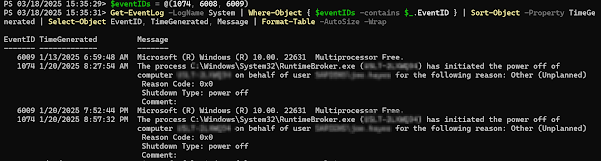
Get Restart log using PowerShell
I'm often curious about a restart on a Windows server system. An easy way to get a list of the restart and what initiated it is to use t...
-
Most of what we're going to want to look at when you're having production issues are available through DMV's. If granti...
-
I’ve been having some trouble getting DBCA to run in order to create databases. Thought I’d share it with you, and thus document it for la...
-
I'm often curious about a restart on a Windows server system. An easy way to get a list of the restart and what initiated it is to use t...
