Thursday, April 14, 2005

Start Cmd.Exe by right-clicking explorer

Link to page where found:
https://secure.codeproject.com/shell/commandprompt.asp

This page has tremendous information on dealing with the Windows Shell & extensions as related to starting cmd.exe from explorer

and, because links tend to break - an excpert

Selecting this entry will open a DOS prompt with its current directory set to the folder you just right-clicked.
  1. Open your registry (regedit)

  2. Go to the following key: HKEY_CLASSES_ROOT\Folder\shell
  3. Add this key: CmdPrompt and set its default value to: "Command Prompt"
  4. Under this new key, add the following key: Command and set its default value to: "c:\winnt\system32\cmd.exe"

You should now have this tree in your registry:

That's it. Now, whenever you will right-click on a folder, the pop-up menu will contain an entry called "Command Prompt".

Tuesday, April 12, 2005

Great spot to download individual Windows 2000 resource kit tools

http://www.petri.co.il/download_free_reskit_tools.htm

A better way is to use the Forfiles tool, which you can find in the Windows resource kits. Forfiles lets you perform a date-based deletion. Here's a sample command:

Forfiles -p R:\MyFiles -s -m *.*
-d -365 -c "Cmd /C Echo
0x22@Path\@File0x22"
article on how to delete old files:
http://www.windowsitpro.com/Article/ArticleID/44891/44891.html

Wednesday, April 06, 2005

You need a Windows 2000 or later to run this stub because it uses these features

Ran into this problem when upgrading (migrating) a project from VC++ 6 to VC++7. Actually, I think that I recall having this issue in VC++6 as well, but that's been a few years ago, so memory is fuzzy.

Possible answers:
1. You may also see this error if you build an ATL project with the /robust MIDL compiler option. /robust is only for use when building for a Windows 2000 or later machine. So, either remove /robust or change this line in the dlldatax.c file:#define _WIN32_WINNT 0x0400 //for WinNT 4.0 or Win95 with DCOMto #define _WIN32_WINNT 0x0500 //for WinNT 4.0 or Win95 with DCOM

2. If you change RpcNdr.h to:
#if (0x500 <= _WIN32_WINNT)
#define TARGET_IS_NT50_OR_LATER 0 // 1
#else
#define TARGET_IS_NT50_OR_LATER 1 // 0
#endi

The link to this can be found at:
http://www.codeguru.com/forum/printthread.php?t=307745

Thursday, March 31, 2005

Submit JCL through FTP

This is something that I did back in my MCI days of integrating Windows NT servers with mainframes in the land of no budget.

1. Establish a connection with the MVS/S390/Z-OS host
2. quote site filetype=jes
3. put preexist.jcl
Where preexist.jcl is the JCL that will be submitted. It needs to be located on the submitting box, not the mainframe.

Also, I found article that says you can retrieve the output thusly:

To submit a pre-existing JCL job stream via FTP and retrieve the results can be as simple as:
ftp mvs.host
quote site filetype=jes
get preexist.jcl jes.output

http://expertanswercenter.techtarget.com/eac/
knowledgebaseAnswer/0,295199,sid63_gci984797,00.html

To further automate the process, you can store the ftp commands in a file and use ftp -s:

Wednesday, March 30, 2005

Problem getting JAVA GUI to show itself

When i would run the debugger on a SWING based JAVA utility that I had written using WSAD in order to read data from an iseries DTAQ object, and the java icon would appear when doing an alt-tab, but I couldn't find the GUI. Turns out that WSAD didn't auto-generate the following code ...


TEST1 T1 = new TEST1();
T1.show();

... in the main method.

I don't know if this was my mistake, or if WSAD is really this challenged to anticipate the need for this terribly, terribly boiler-plate code.

By the by, why aren't there any freely downloadable iseries utilities to work with dataqueues? I'll post the one that I have when it's "finished". That could be a while. It currenlty will only read from a dataqueue and clear the contents.

Yep, I'm an idiot: WSAD import

Again, to my knowledge, all you need to do is the steps I depicted below.

-----Original Message-----From: Hayes, Joe Sent: Tuesday, March 29, 2005 10:11 AMTo: Indraganti, Sastry; Zheng, JasonSubject: RE: WSAD Question

You’re the man, Sastry. Much obliged.
So, to clarify, in the future, do I need to do all three of these things, or do I just need to do the thing that you said?
Thanks again.
Joe

_____________________________________________From: Indraganti, Sastry Sent: Tuesday, March 29, 2005 10:03 AMTo: Hayes, Joe; Zheng, JasonSubject: RE: WSAD Question

To the best of my knowledge, Go to your project, click on properties, Go to Java build path, then to libraries and then click on add external jars and browse to wherever you have jt400.jar. This should solve the problem.
Jason- You could correct me if I am wrong. Thanks!
Sastry

-----Original Message-----From: Hayes, Joe Sent: Tuesday, March 29, 2005 9:58 AMTo: Zheng, Jason; Indraganti, SastrySubject: WSAD Question
I’m trying to get WSAD to import com.ibm.as400.* from JT400, but keep getting a message stating that com.ibm.as400 cannot be resolved.
I’ve added the jt400.jar file to my classpath variable via Window->Preferences->Java->CLASSPATH.
I’ve also right-clicked the project and done import->File System-> and browsed to the jar file to select it.
Is there something else that I have to do to get WSAD to find the jar file?
Joe

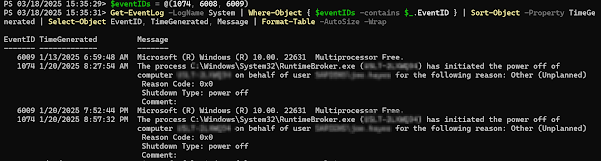
Get Restart log using PowerShell

I'm often curious about a restart on a Windows server system. An easy way to get a list of the restart and what initiated it is to use t...