Tuesday, July 16, 2013

Getting immediate notifications for deadlocks in SQL Server

Today I learned that I can get immediate notification of deadlocks in SQL Server.  This is very useful, since one of our applications is prone to deadlocks (due to it's remarkable configurability), and these can be difficult to reproduce, especially in production.

First - a disclaimer.  This method does not email the deadlock graph to you, only an alert saying that the deadlock has occurred.  It is assumed that you are running a server-side trace to capture the necessary information for trouble-shooting.  This is only to give you the alert.

    1. Assure that the 1205 message is actually logged. (very good info on this in Michael K. Campbell's article for Practical SQL Server)
                      EXEC master..sp_altermessage 1205, 'WITH_LOG', TRUE;
                      GO
    1. Assure that SQLMail is configured
      1. NOTE: The step I forget most often is to assure that mail is enabled under SQL Server Agent -> Properties, as is outlined here.
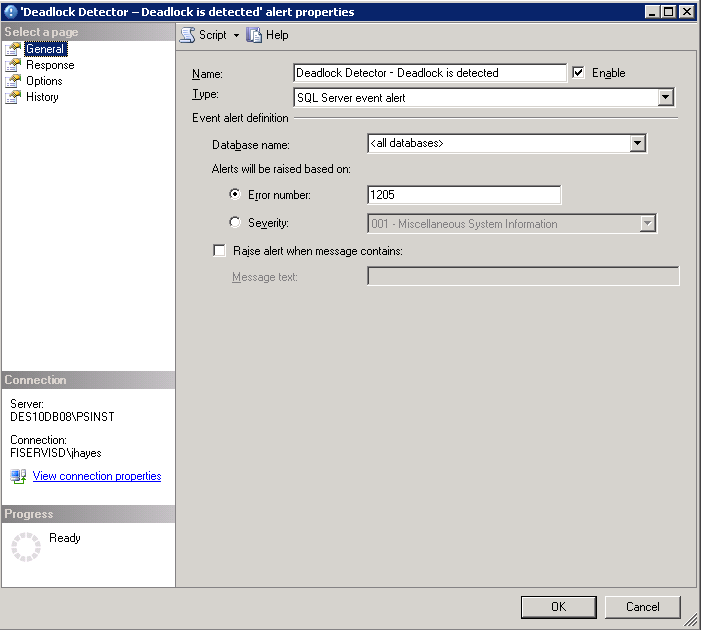
    2. Create an alert for 1205 message.
  1. NOTE: This will only set up the notification.  You also have to configure a default monitor to detect deadlocks.  The mail will only prompt you to go and have a look at the deadlock trace!
References used in compiling this procedure:


Info on the error message I encountered in using sqlmail with alerts:
Error: An attempt was made to send an email when no email session has been established
Link  ; http://www.sqldbadiaries.com/2010/07/27/an-attempt-was-made-to-send-an-email-when-no-email-session-has-been-established-sql-server-2005/

Procedure for setting up alerts:
http://sqlmag.com/blog/enabling-email-alerts-sql-server-deadlocks

Test Script to simulate deadlock:
http://www.sqlteam.com/forums/topic.asp?TOPIC_ID=49692 


Monday, July 08, 2013

backup Db2- unable to force applications

When trying to backup a db on db2 LUW 9.5, I get the following message, even after running quiesce.

SQL1035N The database is currently in use. SQLSTATE=57019
 
There is some good advice involving authority here: http://www.dbforums.com/db2/1663529-backup-db2-unable-force-applications.html#post6596923

However, it did not apply to my situation.

In desperation, I decided to just restart the instance.
When I did, I got an error indicating invalid credentials.

I had to go into the Windows Service and change the password for the user.
That cleared up the issue.

Whaddya know...

Wednesday, July 03, 2013

DB2 (and WebSphere) infocenter vs Developerworks

Just a quick note for those who may encounter it.
IBM's InfoCenters, or the ones for DB2 and WebSphere at any rate, are great at containing a fantastic amount of words that really don't tell you anything.

For task-based procedures, I like to go to DeveloperWorks and do a site search.


Tuesday, July 02, 2013

Tips for working an office-style job from your home.


Tips for Working from Home:

Make a space

               This space needs to be comfortable, but not TOO comfortable, and have few distractions.  It needs to offer the quiet environment you need and allow you to focus on your work without thinking about kids or other distractions

Don’t watch the kids, do chores, etc

               For full time WFH, it is unlikely that you’ll be able to do your best work if you’re also attending to children.  This is the reason a lot of people want to work from home.  I suppose if you can do it and get away with it, OK, but for me, they would be wanting too much attention and cause too many interruptions. My children know that, when Dad’s at work and the office door is closed, they stay away.  When my wife has to work, we get a baby-sitter.
               If someone calls you and needs you to do something, say no.  If the spouse wants you to watch kids while they run errands, say no. You are AT WORK (PERIOD).

Create a social Context

               The lack of human contact can be very isolating.  Create your own social outlet through a religious organization, hobby or enthusiasts group, etc.  It’s tough to justify this if you’re working long hours and you have a family, but, at least for me, it really is necessary to maintain an even keel.
Pretend someone is watching you.
               Discipline is tough, and it’s easy to let it break down when no one can see what you’re doing.

Get Exercise!

               You don’t realize how much you move when going to the office, and being at the office.  Much of this very simple movement can be lost if you work from your home.  It is VITAL that you find a way to get exercise.  Go for a walk over lunch, join a gym, do tai chi, whatever suits you, but for heaven’s sake, do something!

Thursday, May 23, 2013

Find out where you're logged on

As a sysadmin, I end up logged in all over the place.
Periodically, I'm asked to change my password, and if I'm not logged out from every server, it can cause all sorts of issues.


Update: 2013-11-11
Ignore everything below.  This is so much easier than I was making it.
PsLoggedOn will simply scan your network and tell you where you're logged on. Not sure how I missed this!
http://technet.microsoft.com/en-us/sysinternals/bb897545

Example:
PsLoggedon.exe -l MyDomain\MyUser

*facepalm*
___

There is a WMIC command that can be used to see where you're logged in at on the network. This is probably the recommended way if you're running newer servers.
L
However, we still have a lot of older servers that don't fully support WMIC.  I therefore take the following approach:

From command prompt, run
NET VIEW | FIND /I "DB" > SERVERLIST.txt
This populates the list with all DB servers (per our naming conventions).

I then run
NET VIEW | FIND /I "AS" >> SERVERLIST.txt
This, per our naming conventions, appends the app servers (hosting jboss or WebSphere).
Note the >>, so that the SERVERLIST.txt is not overwritten by the output redirection.

I then execute PSLOGGEDON (download from sysinternals/PSTools) as follows:
for /F %i in (SERVERLIST.txt) do PsLoggedon.exe -L %i >> loggedon_output.txt 2>&1
This will read the systems in SERVERLIST.txt and, for each one, execute the PSLoggedon.exe -L command.  Output will be piped to loggedon_output.txt.
NOTE: loggedon_output.txt is not truncated at any point.  If you're like me and tend to run this from the same place over and over again, you'll need to clean it up manually before you begin.

Good luck :-)

Tuesday, April 30, 2013

WMIC to create a report of free disk space on servers

To see the free space on drives for a server, use the following command.
NOTE:  Replace   with the name of your server.

C:\temp>wmic /AGGREGATE:Off /FAILFAST:On /RECORD:outout.xml /NODE: "" logicaldisk get SystemName,description,DeviceID,FreeSpace
Description              DeviceID  FreeSpace    SystemName
3 1/2 Inch Floppy Drive  A:                     DEN01VMDBSOLO01
Local Fixed Disk         C:        12263886848  DEN01VMDBSOLO01
Local Fixed Disk         D:        78583287808  DEN01VMDBSOLO01
Local Fixed Disk         E:        78348578816  DEN01VMDBSOLO01
CD-ROM Disc              F:                     DEN01VMDBSOLO01
Network Connection       R:        52428800000  DEN01VMDBSOLO01


Even better, you can do so for a whole list of servers, by
A) Creating a comma delimited or newline delimited (on server on each line) list of server names in a .txt file.
Example:
Server1
Server2
Server3
Server4

B) Replacing with @ServerList.txt, where ServerList.txt is the name of your text file.

Awesome.

Tuesday, April 16, 2013

Issues with mouse direct-connected to hp EliteBook 8540w

CORRECTION:
Everything below the horizontal line is crazy-talk.  Sorry.
It was a problem with the mouse itself. I believe the USB connection was damaged.

________________________________________________________________________________________


I've been having issues recently with my mouse disconnecting and then reconnecting for no apparent reason when plugged directly into a USB port on my laptop.
I went into Control Panel -> Mouse, and found that my pointer was configured as shown:
Before: Synaptics TouchStyk V2.0 on PS/2 Port 0

I changed it to use the V7.0 Synaptic driver, and it appears to be working much better.
After: Synaptics TouchPad V7.2 on PS/2 Port 3

I also recajiggered the pointer so it's bigger and has a tail.

Not sure if this will help anyone, ever, but it's been really annoying me, so I thought I'd share just in case ;-)

Get Restart log using PowerShell

I'm often curious about a restart on a Windows server system. An easy way to get a list of the restart and what initiated it is to use t...