There is a very good article on moving Oracle data files to be found here: https://docs.oracle.com/cd/B28359_01/server.111/b28310/dfiles005.htm
Unfortunately, it does no include a final step to bring the tablespace back online.
The command is simple:
ALTER TABLESPACE USERS
ONLINE;
So, execute the procedure in the link above, and when finished, make sure you bring your table-space back online.
Wednesday, March 30, 2016


Tuesday, March 08, 2016
IBM DATA STUDIO DEBUGGER OUT OF SYNC WITH SOURCE
I struggled most of the morning with my IBM Data Studio 4.1 debugger being out of sync with my source as I stepped through it.
The answer seems to be that I was creating string variables that had newlines in them.
Example:

The answer seems to be that I was creating string variables that had newlines in them.
Example:
SET PPN_INSERT_STRING = 'INSERT INTO FEDICC.MIG_PARTY_PERSON_NAME (
PARTY_PERS_NM_ID,
PARTY_ID,
PERS_NM_TTL_CD,
PERS_NM_SUFX_CD,
PERS_NM_TYP_CD,
PARTY_PERS_NM_NM_LST,
PARTY_PERS_NM_NM_FST,
PARTY_PERS_NM_NM_MID,
PARTY_PERS_NM_NM_UPCS_SRCH,
PARTY_PERS_NM_NM_DISP_DRV,
PARTY_PERS_NM_NM_LST_UPCS_SRCH,
PARTY_PERS_NM_NM_FST_UPCS_SRCH,
PARTY_PERS_NM_NM_MID_UPCS_SRCH,
PARTY_PERS_NM_NM_LST_DUP_SRCH,
PARTY_PERS_NM_NM_FST_DUP_SRCH,
PARTY_PERS_NM_NM_MID_DUP_SRCH,
EXTRNL_SYS_ID_VAL_TXT,
PARTY_PERS_NM_EFF_DT,
PARTY_PERS_NM_END_DT,
CNCURNCY_ID,
AUDT_USER_CREA_ID,
AUDT_USER_CREA_DTM,
AUDT_USER_UPDT_ID,
AUDT_USER_UPDT_DTM,
DEL_IND) VALUES ';
I changed this to be all on one line, and the debugger is no synced with the source.
There must be some defect by which the debugger cannot properly handle statements like the one above.
This works: (Using screen shot since it will just paginate on the blog):

To achieve this, I used Notepad++ with a regular expression search, replacing \r\n with a space, and then replaceing * with a single space.
Happy hunting :)
Tuesday, February 23, 2016
Leadership
I think that this might be the best, most succinct article on leadership I've ever read.
You may have to create a login to read it, but I've found SQLServer Central to be a great resource for the SQL Server DBA, so it's well worth your time.
You may have to create a login to read it, but I've found SQLServer Central to be a great resource for the SQL Server DBA, so it's well worth your time.
Leadership and the Data Professional
http://www.sqlservercentral.com/blogs/the-sql-professor/2016/02/10/leadership-and-the-data-professional/Tuesday, December 08, 2015
Insert horizontal lines in Word 2007
If you google "Insert Horizontal Lines in Word 2007", you will get all sorts of hits such as the following: https://support.office.com/en-in/article/Insert-horizontal-lines-9bf172f6-5908-4791-9bb9-2c952197b1a9
However, what if simply typing --- and hitting "Enter" doesn't work?!!!
I poked and prodded and searched for quite literally hours trying to find this.
Microsoft has cleverly hidden this in the following ways.
First, you have to figure out where your auto-format settings are.
For Word 2007, in order to access them, you have to add them to the quick access toolbar, as described here.
The second step is to access the auto-correct settings, and then go into Options
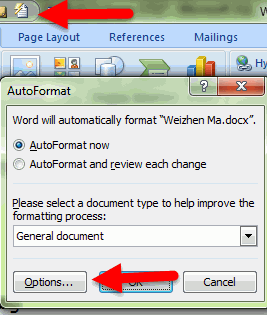
Finally, and perhaps most *cough-cough* intuitively of all, you go to "Apply as you type", and select the "Border Lines" check-box.
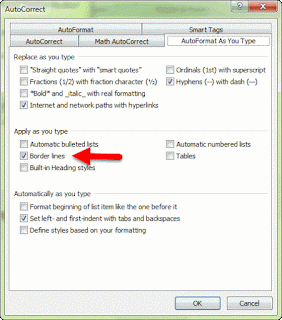
And, NOW, you can finally insert your horizontal lines by typing ---[Enter] again.
Let the Good Times Roll :)
However, what if simply typing --- and hitting "Enter" doesn't work?!!!
I poked and prodded and searched for quite literally hours trying to find this.
Microsoft has cleverly hidden this in the following ways.
First, you have to figure out where your auto-format settings are.
For Word 2007, in order to access them, you have to add them to the quick access toolbar, as described here.
The second step is to access the auto-correct settings, and then go into Options

Finally, and perhaps most *cough-cough* intuitively of all, you go to "Apply as you type", and select the "Border Lines" check-box.
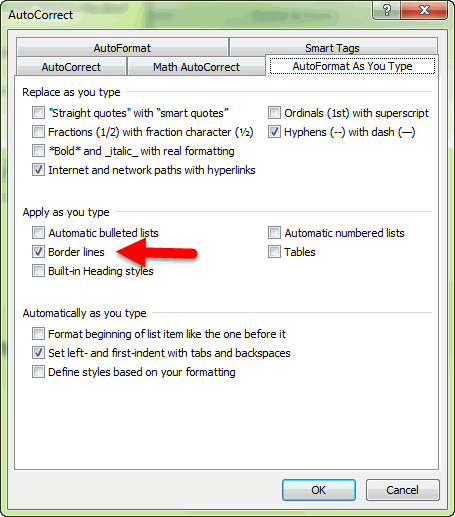
And, NOW, you can finally insert your horizontal lines by typing ---[Enter] again.
Let the Good Times Roll :)
Friday, November 27, 2015
Capturing Messages, using SMO in VB.NET
I have done some searching for a simple, clear example of how to capture all messages when running a query against Microsoft SQL Server using the SQL Management Objects (SMO).
I haven't been at all happy with what I've found, so I thought I would post the following example, hopefully as a clear and concise code example
VB.NET
SMO
A few notes:
1 - "Messages" is a text TextBox that I am using, as you might guess, to write messages to
2 - Note the "AddressOf" in the AddHandler method call. This registers the method so that messages can be passed to the application and handled.
3- I had to define MigDBServer as
Private MigDBServer As Microsoft.SqlServer.Management.Smo.Server
4 - It is also necessary to add a reference to the ddl that contains the Microsoft SMO extensions.
Add Reference by going to Project-> Add References.
Then choose Assemblies->Extensions, and select Microsoft.SqlServer.Smo

Code:
Click Image to view larger Version:

Capturing Messages, using SMO in VB.NET
I have done some searching for a simple, clear example of how to capture all messages when running a query against Microsoft SQL Server using the SQL Management Objects (SMO).
I haven't been at all happy with what I've found, so I thought I would post the following example, hopefully as a clear and concise code example
VB.NET
SMO
A few notes:
1 - "Messages" is a text TextBox that I am using, as you might guess, to write messages to
2 - Note the "AddressOf" in the AddHandler method call. This registers the method so that messages can be passed to the application and handled.
3- I had to define MigDBServer as
Private MigDBServer As Microsoft.SqlServer.Management.Smo.Server
Click Image to view larger Version:
Thursday, July 16, 2015
Monitor SQL Server Service using PowerShell
Mashrur Shuvo posted a script over at SQL Server Central that will user powershell to monitor your sql server services.
If you're like me, and you have trouble getting budget approval for 3rd party monitoring tools, then this is very Useful (with a capital - U ;-) ) !
http://www.sqlservercentral.com/scripts/Monitor+SQL+Server+and+Service/127705/
If you're like me, and you have trouble getting budget approval for 3rd party monitoring tools, then this is very Useful (with a capital - U ;-) ) !
http://www.sqlservercentral.com/scripts/Monitor+SQL+Server+and+Service/127705/
Subscribe to:
Posts (Atom)
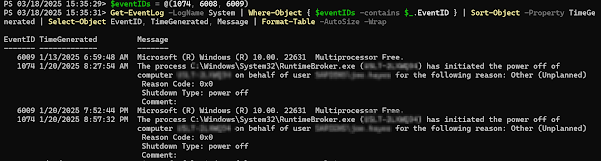
Get Restart log using PowerShell
I'm often curious about a restart on a Windows server system. An easy way to get a list of the restart and what initiated it is to use t...