Glenn Berry, over at SQL Server Central, has written an excellent and straight-forward guide to initial settings for max memory in SQL Server, given the amount of memory available on the server.
Suggested Max Memory Settings for SQL Server 2005/2008
I would encourage you to visit his article for details, but here follows the crux of the matter:
Physical RAM MaxServerMem Setting
2GB 1500
4GB 3200
6GB 4800
8GB 6400
12GB 10000
16GB 13500
24GB 21500
32GB 29000
48GB 44000
64GB 60000
72GB 68000
96GB 92000
128GB 124000
Again, note that he goes on to give more advice on tuning with additional products, and how much memory should be available to the system when under max load. I would encourage you to check out the original article.
Wednesday, October 04, 2017


Friday, September 15, 2017
Creating Hash Values for Strings In MSSQL, DB2 UDB for LUW, and Oracle
It will often occur that we need to search a large character string in a relational database, something like an email address, postal address, etc.
For the most part, when we do such searches, we're searching for a sub-string within that large string of characters.
However, for instances where we know we need an equivalency search, we can make things more efficient by generating a hash of the string and then storing that in an indexed column.
This can be done in all 3 of the major RDBMS platforms. Links below:
MSSQL uses the CHECKSUM() function.
DB2 LUW uses the DBMS_UTILITY.GET_HASH_VALUE() function.
Oracle uses the ORA_HASH function.
This article by Jeff Reinhard over at SQLServerCentral.com is what inspired me to look for the similar function in DB2 & Oracle, and it does a very nice job of explaining the use case for this using an e-mail address scenario.
If anyone knows how to do this in postgressql or MySQL, I'd love to have you add a few words or link in the comments. Thanks! :)
For the most part, when we do such searches, we're searching for a sub-string within that large string of characters.
However, for instances where we know we need an equivalency search, we can make things more efficient by generating a hash of the string and then storing that in an indexed column.
This can be done in all 3 of the major RDBMS platforms. Links below:
MSSQL uses the CHECKSUM() function.
DB2 LUW uses the DBMS_UTILITY.GET_HASH_VALUE() function.
Oracle uses the ORA_HASH function.
This article by Jeff Reinhard over at SQLServerCentral.com is what inspired me to look for the similar function in DB2 & Oracle, and it does a very nice job of explaining the use case for this using an e-mail address scenario.
If anyone knows how to do this in postgressql or MySQL, I'd love to have you add a few words or link in the comments. Thanks! :)
Wednesday, May 03, 2017
I had previous written very breifly about creating a report on disk space using WMI
A much better, and very concise instruction for querying disk information (including %free) can be found here:
https://msdn.microsoft.com/en-us/library/aa394173(v=vs.85).aspxThis could be easily adapted to be driven from a list of servers in a text file, in a query, or received from something like a net view command
Write-Host "Drive information for MY_Server"
Get-WmiObject -Class Win32_LogicalDisk -ComputerName MY_Server |
Where-Object {$_.DriveType -ne 5} |
Sort-Object -Property Name |
Select-Object Name, VolumeName, FileSystem, Description, VolumeDirty, `
@{"Label"="DiskSize(GB)";"Expression"={"{0:N}" -f ($_.Size/1GB) -as [float]}}, `
@{"Label"="FreeSpace(GB)";"Expression"={"{0:N}" -f ($_.FreeSpace/1GB) -as [float]}}, `
@{"Label"="%Free";"Expression"={"{0:N}" -f ($_.FreeSpace/$_.Size*100) -as [float]}} |
Format-Table -AutoSize
OUTPUT:
Drive information for MY_Server
Name VolumeName FileSystem Description VolumeDirty DiskSize(GB) FreeSpace(GB) %Free
---- ---------- ---------- ----------- ----------- ------------ ------------- -----
A: 3 1/2 Inch Floppy Drive 0 0
C: NTFS Local Fixed Disk False 59.9 5.83 9.74
D: Programs NTFS Local Fixed Disk False 200 18.03 9.02
E: Product_1 NTFS Local Fixed Disk False 250 99.57 39.83
F: Product_2 NTFS Local Fixed Disk False 20 7.02 35.09
R: Product_3 MVFS Network Connection 78.13 48.83 62.5
Tuesday, March 21, 2017
Minimally Logged Operations in SQL Server
I'm posting this mostly so I can find it later :)
The following article has a great table that defines when operations will be minimally logged.
https://technet.microsoft.com/en-us/library/dd425070(v=sql.100).aspx
Here's the table, just in case the link goes away at some point in the future:
Table Indexes
The following article has a great table that defines when operations will be minimally logged.
https://technet.microsoft.com/en-us/library/dd425070(v=sql.100).aspx
Here's the table, just in case the link goes away at some point in the future:
Table Indexes
| Rows in table | Hints | Without TF 610 | With TF 610 | Concurrent possible | |
|---|---|---|---|---|---|
Heap
|
Any
|
TABLOCK
|
Minimal
|
Minimal
|
Yes
|
Heap
|
Any
|
None
|
Full
|
Full
|
Yes
|
Heap + Index
|
Any
|
TABLOCK
|
Full
|
Depends (3)
|
No
|
Cluster
|
Empty
|
TABLOCK, ORDER (1)
|
Minimal
|
Minimal
|
No
|
Cluster
|
Empty
|
None
|
Full
|
Minimal
|
Yes (2)
|
Cluster
|
Any
|
None
|
Full
|
Minimal
|
Yes (2)
|
Cluster
|
Any
|
TABLOCK
|
Full
|
Minimal
|
No
|
Cluster + Index
|
Any
|
None
|
Full
|
Depends (3)
|
Yes (2)
|
Cluster + Index
|
Any
|
TABLOCK
|
Full
|
Depends (3)
|
No
|
Friday, November 18, 2016
Problems creating DB2 UDB LUW db from GUI tools
I've had tons of problems creating db's (or doing some other operations) from the GUID tools, including Data Studio, and the control center (under db2 9.7).
It's always complained about the DAS, but the DAS (the DB2 Administration Server) is always happily running.
Today I stumbled across something that told me to issue the following command:
I then ran a
!!!! WORKED LIKE A CHARM !!!!
After that, I was able to successfully verify the instance, connect, and create the db I was trying to create.
Sorry - wish I had captured some screenshots along the way, but now that I've fixed it, I can't reproduce ;-)
At any rate, hope this helps someone.
It's always complained about the DAS, but the DAS (the DB2 Administration Server) is always happily running.
Today I stumbled across something that told me to issue the following command:
db2admin create
I then ran a
db2admin start
!!!! WORKED LIKE A CHARM !!!!
After that, I was able to successfully verify the instance, connect, and create the db I was trying to create.
Sorry - wish I had captured some screenshots along the way, but now that I've fixed it, I can't reproduce ;-)
At any rate, hope this helps someone.
Tuesday, October 18, 2016
Getting read-only access to DMV's for querying system and performance stats
Most of what we're going to want to look at when you're having
production issues are available through DMV's.
If granting select to sys.dm* is a bit too much, these are the
tables I'm generally most interested in:
Required Permissions:
To query a dynamic management view or function requires SELECT
permission on object and VIEW SERVER STATE or VIEW DATABASE STATE
permission.
For Query tuning:
sys.dm_exec_query_stats
sys.dm_exec_sql_text
sys.dm_exec_text_query_plan
For general Waits and locks:
sys.dm_tran_locks
sys.dm_os_wait_stats
For Missing Indexes:
sys.dm_db_missing_index_group_stats
sys.dm_db_missing_index_groups
sys.dm_db_missing_index_details
sys.databases
For IO_STALL:
sys.dm_io_virtual_file_stats
sys.master_files/* NOTE: The following should not be needed as users are already set upUSE [master]GOCREATE USER [theUser] FOR LOGIN [theUser] WITH DEFAULT_SCHEMA=[dbo]GOUSE [master]GOGRANT CONNECT TO [theUser]GO*/USE [master]GOGRANT SELECT ON sys.dm_os_hosts TO [theUser]GRANT SELECT ON sys.dm_os_memory_brokers TO [theUser]GRANT SELECT ON sys.dm_os_memory_allocations TO [theUser]GRANT SELECT ON sys.dm_db_mirroring_past_actions TO [theUser]GRANT SELECT ON sys.dm_xe_session_object_columns TO [theUser]GRANT SELECT ON sys.dm_os_loaded_modules TO [theUser]GRANT SELECT ON sys.dm_db_task_space_usage TO [theUser]GRANT SELECT ON sys.dm_os_memory_objects TO [theUser]GRANT SELECT ON sys.dm_audit_class_type_map TO [theUser]GRANT SELECT ON sys.dm_os_schedulers TO [theUser]GRANT SELECT ON sys.dm_os_server_diagnostics_log_configurations TO [theUser]GRANT SELECT ON sys.dm_hadr_instance_node_map TO [theUser]GRANT SELECT ON sys.dm_os_dispatcher_pools TO [theUser]GRANT SELECT ON sys.dm_os_threads TO [theUser]GRANT SELECT ON sys.dm_exec_requests TO [theUser]GRANT SELECT ON sys.dm_tran_commit_table TO [theUser]GRANT SELECT ON sys.dm_fts_outstanding_batches TO [theUser]GRANT SELECT ON sys.dm_repl_tranhash TO [theUser]GRANT SELECT ON sys.dm_hadr_cluster TO [theUser]GRANT SELECT ON sys.dm_qn_subscriptions TO [theUser]GRANT SELECT ON sys.dm_db_session_space_usage TO [theUser]GRANT SELECT ON sys.dm_exec_query_optimizer_info TO [theUser]GRANT SELECT ON sys.dm_xe_map_values TO [theUser]GRANT SELECT ON sys.dm_tran_top_version_generators TO [theUser]GRANT SELECT ON sys.dm_fts_fdhosts TO [theUser]GRANT SELECT ON sys.dm_xe_sessions TO [theUser]GRANT SELECT ON sys.dm_db_log_space_usage TO [theUser]GRANT SELECT ON sys.dm_hadr_name_id_map TO [theUser]GRANT SELECT ON sys.dm_os_waiting_tasks TO [theUser]GRANT SELECT ON sys.dm_exec_background_job_queue TO [theUser]GRANT SELECT ON sys.dm_db_missing_index_details TO [theUser]GRANT SELECT ON sys.dm_clr_properties TO [theUser]GRANT SELECT ON sys.dm_os_sublatches TO [theUser]GRANT SELECT ON sys.dm_exec_query_memory_grants TO [theUser]GRANT SELECT ON sys.dm_logpool_hashentries TO [theUser]GRANT SELECT ON sys.dm_tran_current_snapshot TO [theUser]GRANT SELECT ON sys.dm_os_wait_stats TO [theUser]GRANT SELECT ON sys.dm_os_memory_node_access_stats TO [theUser]GRANT SELECT ON sys.dm_os_spinlock_stats TO [theUser]GRANT SELECT ON sys.dm_database_encryption_keys TO [theUser]GRANT SELECT ON sys.dm_hadr_availability_replica_states TO [theUser]GRANT SELECT ON sys.dm_broker_connections TO [theUser]GRANT SELECT ON sys.dm_db_mirroring_auto_page_repair TO [theUser]GRANT SELECT ON sys.dm_server_registry TO [theUser]GRANT SELECT ON sys.dm_os_dispatchers TO [theUser]GRANT SELECT ON sys.dm_os_stacks TO [theUser]GRANT SELECT ON sys.dm_filestream_non_transacted_handles TO [theUser]GRANT SELECT ON sys.dm_xe_session_targets TO [theUser]GRANT SELECT ON sys.dm_audit_actions TO [theUser]GRANT SELECT ON sys.dm_hadr_availability_group_states TO [theUser]GRANT SELECT ON sys.dm_os_ring_buffers TO [theUser]GRANT SELECT ON sys.dm_db_missing_index_groups TO [theUser]GRANT SELECT ON sys.dm_hadr_cluster_members TO [theUser]GRANT SELECT ON sys.dm_db_uncontained_entities TO [theUser]GRANT SELECT ON sys.dm_exec_cached_plans TO [theUser]GRANT SELECT ON sys.dm_hadr_availability_replica_cluster_states TO [theUser]GRANT SELECT ON sys.dm_exec_sessions TO [theUser]GRANT SELECT ON sys.dm_broker_forwarded_messages TO [theUser]GRANT SELECT ON sys.dm_resource_governor_resource_pools TO [theUser]GRANT SELECT ON sys.dm_os_memory_clerks TO [theUser]GRANT SELECT ON sys.dm_hadr_auto_page_repair TO [theUser]GRANT SELECT ON sys.dm_repl_articles TO [theUser]GRANT SELECT ON sys.dm_xe_session_events TO [theUser]GRANT SELECT ON sys.dm_fts_memory_buffers TO [theUser]GRANT SELECT ON sys.dm_fts_index_population TO [theUser]GRANT SELECT ON sys.dm_tran_current_transaction TO [theUser]GRANT SELECT ON sys.dm_os_cluster_properties TO [theUser]GRANT SELECT ON sys.dm_os_child_instances TO [theUser]GRANT SELECT ON sys.dm_exec_connections TO [theUser]GRANT SELECT ON sys.dm_server_memory_dumps TO [theUser]GRANT SELECT ON sys.dm_exec_background_job_queue_stats TO [theUser]GRANT SELECT ON sys.dm_os_memory_broker_clerks TO [theUser]GRANT SELECT ON sys.dm_filestream_file_io_handles TO [theUser]GRANT SELECT ON sys.dm_hadr_availability_replica_cluster_nodes TO [theUser]GRANT SELECT ON sys.dm_fts_active_catalogs TO [theUser]GRANT SELECT ON sys.dm_tran_database_transactions TO [theUser]GRANT SELECT ON sys.dm_filestream_file_io_requests TO [theUser]GRANT SELECT ON sys.dm_cdc_log_scan_sessions TO [theUser]GRANT SELECT ON sys.dm_os_memory_cache_clock_hands TO [theUser]GRANT SELECT ON sys.dm_repl_schemas TO [theUser]GRANT SELECT ON sys.dm_db_mirroring_connections TO [theUser]GRANT SELECT ON sys.dm_db_partition_stats TO [theUser]GRANT SELECT ON sys.dm_os_sys_memory TO [theUser]GRANT SELECT ON sys.dm_io_pending_io_requests TO [theUser]GRANT SELECT ON sys.dm_hadr_cluster_networks TO [theUser]GRANT SELECT ON sys.dm_os_nodes TO [theUser]GRANT SELECT ON sys.dm_tcp_listener_states TO [theUser]GRANT SELECT ON sys.dm_os_memory_cache_entries TO [theUser]GRANT SELECT ON sys.dm_os_virtual_address_dump TO [theUser]GRANT SELECT ON sys.dm_cryptographic_provider_properties TO [theUser]GRANT SELECT ON sys.dm_tran_transactions_snapshot TO [theUser]GRANT SELECT ON sys.dm_os_memory_cache_hash_tables TO [theUser]GRANT SELECT ON sys.dm_cdc_errors TO [theUser]GRANT SELECT ON sys.dm_resource_governor_configuration TO [theUser]GRANT SELECT ON sys.dm_exec_query_stats TO [theUser]GRANT SELECT ON sys.dm_fts_semantic_similarity_population TO [theUser]GRANT SELECT ON sys.dm_clr_tasks TO [theUser]GRANT SELECT ON sys.dm_os_worker_local_storage TO [theUser]GRANT SELECT ON sys.dm_db_persisted_sku_features TO [theUser]GRANT SELECT ON sys.dm_db_index_usage_stats TO [theUser]GRANT SELECT ON sys.dm_os_buffer_descriptors TO [theUser]GRANT SELECT ON sys.dm_tran_active_snapshot_database_transactions TO [theUser]GRANT SELECT ON sys.dm_server_services TO [theUser]GRANT SELECT ON sys.dm_tran_active_transactions TO [theUser]GRANT SELECT ON sys.dm_db_file_space_usage TO [theUser]GRANT SELECT ON sys.dm_broker_activated_tasks TO [theUser]GRANT SELECT ON sys.dm_broker_queue_monitors TO [theUser]GRANT SELECT ON sys.dm_os_memory_cache_counters TO [theUser]GRANT SELECT ON sys.dm_tran_session_transactions TO [theUser]GRANT SELECT ON sys.dm_clr_appdomains TO [theUser]GRANT SELECT ON sys.dm_exec_trigger_stats TO [theUser]GRANT SELECT ON sys.dm_os_memory_pools TO [theUser]GRANT SELECT ON sys.dm_os_latch_stats TO [theUser]GRANT SELECT ON sys.dm_io_backup_tapes TO [theUser]GRANT SELECT ON sys.dm_resource_governor_workload_groups TO [theUser]GRANT SELECT ON sys.dm_hadr_database_replica_states TO [theUser]GRANT SELECT ON sys.dm_fts_memory_pools TO [theUser]GRANT SELECT ON sys.dm_resource_governor_resource_pool_affinity TO [theUser]GRANT SELECT ON sys.dm_os_sys_info TO [theUser]GRANT SELECT ON sys.dm_tran_locks TO [theUser]GRANT SELECT ON sys.dm_exec_procedure_stats TO [theUser]GRANT SELECT ON sys.dm_hadr_database_replica_cluster_states TO [theUser]GRANT SELECT ON sys.dm_exec_query_transformation_stats TO [theUser]GRANT SELECT ON sys.dm_exec_query_resource_semaphores TO [theUser]GRANT SELECT ON sys.dm_repl_traninfo TO [theUser]GRANT SELECT ON sys.dm_db_missing_index_group_stats TO [theUser]GRANT SELECT ON sys.dm_fts_population_ranges TO [theUser]GRANT SELECT ON sys.dm_os_performance_counters TO [theUser]GRANT SELECT ON sys.dm_os_workers TO [theUser]GRANT SELECT ON sys.dm_xe_session_event_actions TO [theUser]GRANT SELECT ON sys.dm_db_script_level TO [theUser]GRANT SELECT ON sys.dm_server_audit_status TO [theUser]GRANT SELECT ON sys.dm_io_cluster_shared_drives TO [theUser]GRANT SELECT ON sys.dm_os_tasks TO [theUser]GRANT SELECT ON sys.dm_db_fts_index_physical_stats TO [theUser]GRANT SELECT ON sys.dm_xe_packages TO [theUser]GRANT SELECT ON sys.dm_logpool_stats TO [theUser]GRANT SELECT ON sys.dm_os_memory_nodes TO [theUser]GRANT SELECT ON sys.dm_tran_version_store TO [theUser]GRANT SELECT ON sys.dm_os_windows_info TO [theUser]GRANT SELECT ON sys.dm_os_cluster_nodes TO [theUser]GRANT SELECT ON sys.dm_os_process_memory TO [theUser]GRANT SELECT ON sys.dm_xe_objects TO [theUser]GRANT SELECT ON sys.dm_xe_object_columns TO [theUser]GRANT SELECT ON sys.dm_clr_loaded_assemblies TO [theUser]GOGRANT VIEW SERVER STATE TO [theUser]GOGRANT VIEW DATABASE STATE TO [theUser]GO
Wednesday, August 31, 2016
Performance related trace-flags for SQL Server 2005 & 2008
I mostly wanted to post this in order to record it for later reference.
If you're interested in these flags, please proceed to the MS Support site using the following link.
https://support.microsoft.com/en-us/kb/920093?sd=rss&spid=16139
Subscribe to:
Posts (Atom)
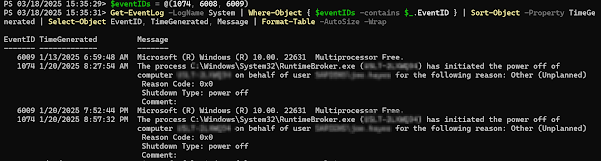
Get Restart log using PowerShell
I'm often curious about a restart on a Windows server system. An easy way to get a list of the restart and what initiated it is to use t...
-
Most of what we're going to want to look at when you're having production issues are available through DMV's. If granti...
-
I’ve been having some trouble getting DBCA to run in order to create databases. Thought I’d share it with you, and thus document it for la...
-
I'm often curious about a restart on a Windows server system. An easy way to get a list of the restart and what initiated it is to use t...
