Tuesday, March 18, 2025

Get Restart log using PowerShell

I'm often curious about a restart on a Windows server system.

An easy way to get a list of the restart and what initiated it is to use the following powershell script.

$eventIDs = @(1074, 6008, 6009)

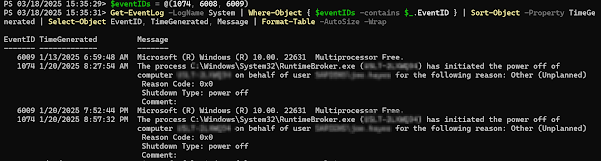
Get-EventLog -LogName System | Where-Object { $eventIDs -contains $_.EventID } | Sort-Object -Property TimeGenerated | Select-Object EventID, TimeGenerated, Message | Format-Table -AutoSize -Wrap


It will produce output similar to this: 


Monday, January 27, 2025

The Database is not accessible after creating Always On Availability Group

 Having created a fully functional SQL Server Always On Availability Group, I connect using SSMS.

Upon trying to expand the database, I get this message: "The database [...] is not accessible (Object Explorer).

The stack trace mentions get_CanGetChildren().


File this one under "sometimes, our lives are meant to serve as a warning to others."

I was connecting to the Windows Server Failover Cluster, rather than the SQL Server listener. SSMS / SQL Server is happy to let you do this, but then you're not able to expand the database.

When I connected via the listener, it worked without issue.


Get Restart log using PowerShell

I'm often curious about a restart on a Windows server system. An easy way to get a list of the restart and what initiated it is to use t...