If I were ever going to shag a guy, it would be Michael Crawford.
Lieber Gott!! The movie (Phantom of the opera) would have been SOOOO much better had these people gotten their way.
Music of the night (sung by MC) is primary in a group of about 3 songs that are my all-time greats. These songs break some great impermiable boundary in my mind, such that no matter how many times I hear them, I'm always excited to hear them again. I've heard this song litterally thousands of times in the last 15 years, and it continues to enthrall.
Thursday, September 22, 2005


Wednesday, June 01, 2005
r6016 - not enough space for thread data
encountered this problem when trying to run VC++6 pgm after SP update on 2000 & XP.
Fixed by changing Project->Properties->C/C++ , category of code generation, Processor from BLEND* to 80386
Fixed by changing Project->Properties->C/C++ , category of code generation, Processor from BLEND* to 80386
Wednesday, April 20, 2005
Deleting files that are greater than 30 days old
In looking for a way to delete files that are older than 30 days, I came across ForFiles.exe:
ForFiles is useful for a couple of reasons:
1. It replaces the FOR command in the command shell, which is extremely powerful and useful, but a bit of a pain.
2. It allows you to use relative time (in days) to select the files that you want to act upon
Because links often break, I've included the content here. This is a microsoft TechNet article.
Link to article:
ForFiles is useful for a couple of reasons:
1. It replaces the FOR command in the command shell, which is extremely powerful and useful, but a bit of a pain.
2. It allows you to use relative time (in days) to select the files that you want to act upon
Because links often break, I've included the content here. This is a microsoft TechNet article.
Link to article:
Forfiles
Updated: January 21, 2005
|


Forfiles
Selects files in a folder or tree for batch processing.
Syntax
forfiles [/p Path] [/m SearchMask] [/s] [/c Command] [/d[{+ | -}] [{MM/DD/YYYY | DD}]]
Parameters
/p Path
Specifies the Path on which you want to start searching. The default folder is the current working directory, which you specify by typing a period (.).
/m SearchMask
Searches files according to SearchMask. The default SearchMask is *.*.
/s
Instructs forfiles to search in subdirectories.
/c Command
Runs the specified Command on each file. You must wrap command strings with spaces in quotation marks. The default Command is "cmd /c echo @file".
/d[{+ | -}] [{MM/DD/YYYY | DD}]
Selects files with a date greater than or equal to (+) or less than or equal to (-) the specified date, where MM/DD/YYYY is the specified date and DD is the current date minus DD days. If you do not specify + or -, + is used. The valid range for DD is 0 - 32768.
/?
Displays help at the command prompt.
Remarks
| • | Forfiles is most commonly used in batch files. | ||||||||||||||||||||||
| • | Forfiles /s is similar to dir /s. | ||||||||||||||||||||||
| • | The following table list the variables that you can use in the /cCommand command string.
| ||||||||||||||||||||||
| • | With forfiles, you can run a command on or pass arguments to multiple files. For example, you could run the TYPE command on all files in a tree with the *.txt extension. Or, you could execute every batch file (*.bat) on the C:\ drive with the file name "Myinput.txt" as the first argument. | ||||||||||||||||||||||
| • | With forfiles, you can do any of the following:
| ||||||||||||||||||||||
| • | Forfiles works by implementing the recurse subdirectories flag on tools designed to process only a single file. | ||||||||||||||||||||||
Examples
To list all of the batch files on drive C:, type:
forfiles /p c:\ /s /m*.bat /c"cmd /c echo @file is a batch file"
To list all of the directories on drive C:, type:
forfiles /p c:\ /s /m*.* /c"cmd /c if @isdir==true echo @file is a directory"
To list all of the files older than 100 days on drive C:, type:
forfiles /p c:\ /s /m*.* /dt-100 /c"cmd /c echo @file : date >= 100 days"
To list all of the files older than January 1, 1993 on drive C:, and then display "file is quite old!" for files with a date older than 01/01/1993, type:
forfiles /p c:\ /s /m*.* /dt-01011993 /c"cmd /c echo @file is quite old!"
To list all of the extensions of all of files on drive C: in column format, type:
forfiles /p c:\ /s /m*.* /c "cmd /c echo extension of @file is 0x09@ext0x09" With:
To list all of the batch files on drive C:, type:
forfiles /p c:\ /s /m *.bat /c "cmd /c echo @file is a batch file"
To list all of the directories on drive C:, type:
forfiles /p c:\ /s /m *.* /c "cmd /c if @isdir==true echo @file is a directory"
To list all of the files older than 100 days on drive C:, type:
forfiles /p c:\ /s /m *.* /d t-100 /c "cmd /c echo @file : date >= 100 days"
To list all of the files older than January 1, 1993 on drive C:, and then display "file is quite old!" for files with a date older than 01/01/1993, type:
forfiles /p c:\ /s /m *.* /d t-01011993 /c "cmd /c echo @file is quite old!"
To list all of the extensions of all of files on drive C: in column format, type:
forfiles /p c:\ /s /m*.* /c "cmd /c echo extension of @file is 0x09@ext0x09"

Formatting legend
| Format | Meaning |
Italic | Information that the user must supply |
Bold | Elements that the user must type exactly as shown |
Ellipsis (...) | Parameter that can be repeated several times in a command line |
Between brackets ([]) | Optional items |
Between braces ({}); choices separated by pipe (|). Example: {even|odd} | Set of choices from which the user must choose only one |
Courier font | Code or program output |
Microsoft Word will not work on a server on which it is not installed
Turns out that Microsoft Word won't work on a server on which it's not installed :)
I support a program that interfaces with the InSystems Calligo Assembly Engine (or assembly server, depending on configuration) through DCOM using the InSystems assembly link toolkit.
We have, over the years, decided to take advantage of every API that the assembly link toolkit affords, and therefore do our printing through a AssemblyLinkDocument.PrintDoc() method.
As it turns out, the .print() method does a very strait-forward automation of MS-Word to accomplish it's printing, and will therefore not work when Word is not isntalled.
This manifest itself by an HResult of 0x80010105 on the call PrintDoc. Some initial googling of the value indicated that this is what you get when you try to invoke a method on an object that has yet to be instantiated.
I support a program that interfaces with the InSystems Calligo Assembly Engine (or assembly server, depending on configuration) through DCOM using the InSystems assembly link toolkit.
We have, over the years, decided to take advantage of every API that the assembly link toolkit affords, and therefore do our printing through a AssemblyLinkDocument.PrintDoc() method.
As it turns out, the .print() method does a very strait-forward automation of MS-Word to accomplish it's printing, and will therefore not work when Word is not isntalled.
This manifest itself by an HResult of 0x80010105 on the call PrintDoc. Some initial googling of the value indicated that this is what you get when you try to invoke a method on an object that has yet to be instantiated.
Thursday, April 14, 2005
Start Cmd.Exe by right-clicking explorer
Link to page where found:
https://secure.codeproject.com/shell/commandprompt.asp
This page has tremendous information on dealing with the Windows Shell & extensions as related to starting cmd.exe from explorer
and, because links tend to break - an excpert
Selecting this entry will open a DOS prompt with its current directory set to the folder you just right-clicked.
https://secure.codeproject.com/shell/commandprompt.asp
This page has tremendous information on dealing with the Windows Shell & extensions as related to starting cmd.exe from explorer
and, because links tend to break - an excpert
Selecting this entry will open a DOS prompt with its current directory set to the folder you just right-clicked.
- Open your registry (regedit)
- Go to the following key: HKEY_CLASSES_ROOT\Folder\shell
- Add this key: CmdPrompt and set its default value to: "Command Prompt"
- Under this new key, add the following key: Command and set its default value to: "c:\winnt\system32\cmd.exe"
You should now have this tree in your registry:

Tuesday, April 12, 2005
Great spot to download individual Windows 2000 resource kit tools
http://www.petri.co.il/download_free_reskit_tools.htm
http://www.windowsitpro.com/Article/ArticleID/44891/44891.html
A better way is to use the Forfiles tool, which you can find in the Windows resource kits. Forfiles lets you perform a date-based deletion. Here's a sample command:
Forfiles -p R:\MyFiles -s -m *.*article on how to delete old files:
-d -365 -c "Cmd /C Echo
0x22@Path\@File0x22"
http://www.windowsitpro.com/Article/ArticleID/44891/44891.html
Wednesday, April 06, 2005
You need a Windows 2000 or later to run this stub because it uses these features
Ran into this problem when upgrading (migrating) a project from VC++ 6 to VC++7. Actually, I think that I recall having this issue in VC++6 as well, but that's been a few years ago, so memory is fuzzy.
Possible answers:
1. You may also see this error if you build an ATL project with the /robust MIDL compiler option. /robust is only for use when building for a Windows 2000 or later machine. So, either remove /robust or change this line in the dlldatax.c file:#define _WIN32_WINNT 0x0400 //for WinNT 4.0 or Win95 with DCOMto #define _WIN32_WINNT 0x0500 //for WinNT 4.0 or Win95 with DCOM
2. If you change RpcNdr.h to:
#if (0x500 <= _WIN32_WINNT)
#define TARGET_IS_NT50_OR_LATER 0 // 1
#else
#define TARGET_IS_NT50_OR_LATER 1 // 0
#endi
The link to this can be found at:
http://www.codeguru.com/forum/printthread.php?t=307745
Possible answers:
1. You may also see this error if you build an ATL project with the /robust MIDL compiler option. /robust is only for use when building for a Windows 2000 or later machine. So, either remove /robust or change this line in the dlldatax.c file:#define _WIN32_WINNT 0x0400 //for WinNT 4.0 or Win95 with DCOMto #define _WIN32_WINNT 0x0500 //for WinNT 4.0 or Win95 with DCOM
2. If you change RpcNdr.h to:
#if (0x500 <= _WIN32_WINNT)
#define TARGET_IS_NT50_OR_LATER 0 // 1
#else
#define TARGET_IS_NT50_OR_LATER 1 // 0
#endi
The link to this can be found at:
http://www.codeguru.com/forum/printthread.php?t=307745
Subscribe to:
Posts (Atom)
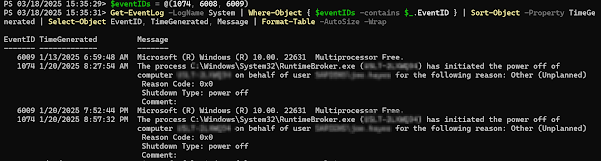
Get Restart log using PowerShell
I'm often curious about a restart on a Windows server system. An easy way to get a list of the restart and what initiated it is to use t...
-
Most of what we're going to want to look at when you're having production issues are available through DMV's. If granti...
-
I'm often curious about a restart on a Windows server system. An easy way to get a list of the restart and what initiated it is to use t...
-
I’ve been having some trouble getting DBCA to run in order to create databases. Thought I’d share it with you, and thus document it for la...
